Interface
Flowinator uses a single native Moho window. Select data from left to right; each selection unlocks the next list.
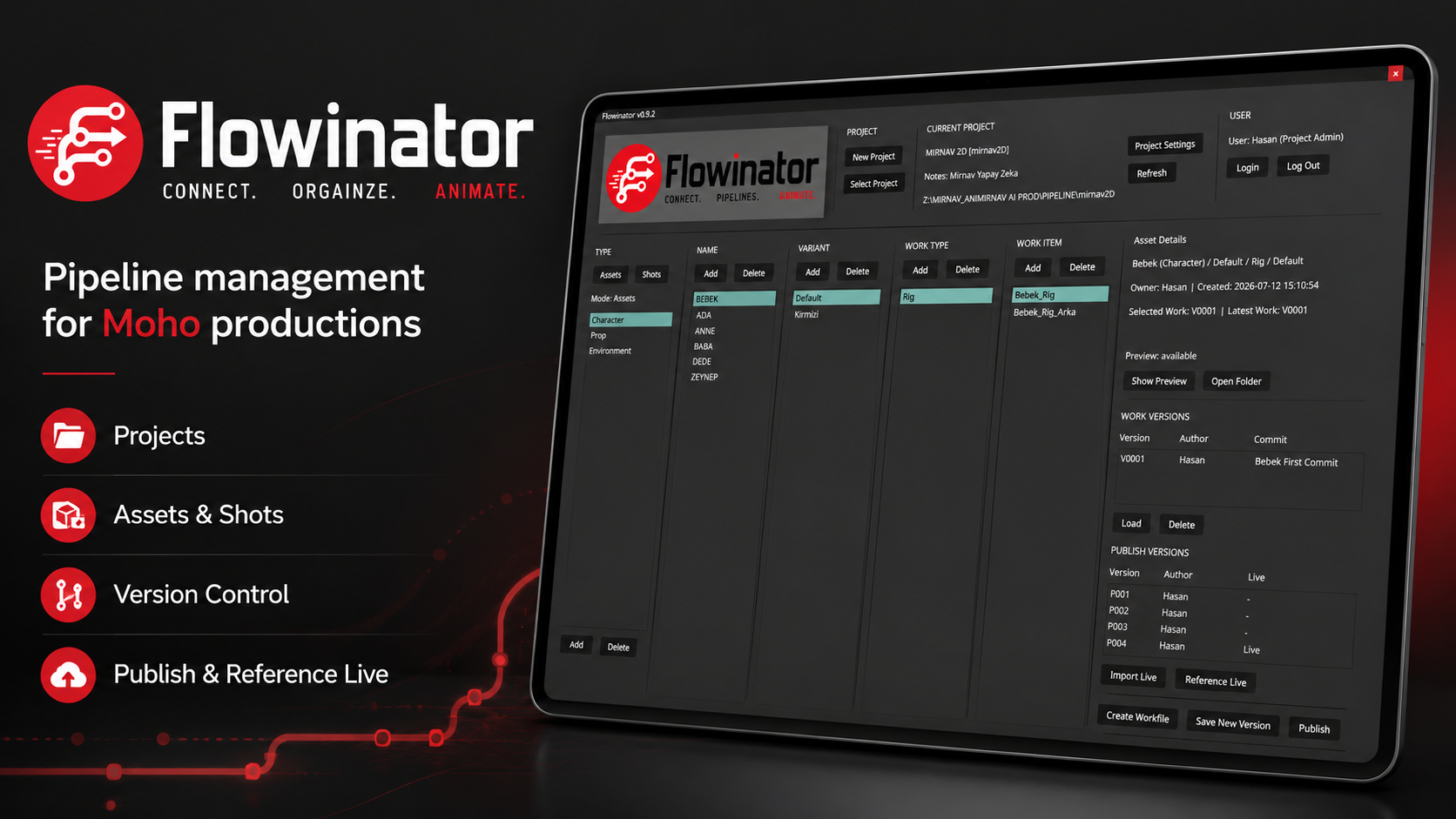
| Area | Purpose |
|---|---|
| Project | Create a project, select an existing project, open Project Settings, or refresh displayed metadata. |
| Current Project | Shows the active project name, code, notes, and location. |
| User | Shows the current local user and provides Login and Log Out. |
| Assets / Shots | Switches the hierarchy between asset production and shot production. |
| Type / Episode | Selects an asset type, or an episode in shot mode. |
| Name / Sequence | Selects an asset name, or a sequence in shot mode. |
| Variant / Shot | Selects an asset variant, or a shot in shot mode. |
| Work Type | Selects a discipline such as Rig, Layout, Animation, or FX. |
| Work Item | Selects the concrete branch that owns workfile versions. |
| Details | Displays selected metadata, work versions, publish versions, and available actions. |
Selection order
Assets
Type > Name > Variant > Work Type > Work Item
Shots
Episode > Sequence > Shot > Work Type > Work Item
The later lists remain unavailable until the previous selection is made. This keeps the UI focused and avoids loading unrelated data.
Main actions
- Create Workfile creates the first numbered workfile for an empty work item. If the selected work item already has a version, Flowinator asks for a new work item instead.
- Save New Version saves the current document as the next numbered workfile version.
- Publish creates a numbered publish and updates the branch's Live file.
- Load opens the selected workfile version.
- Import Live imports the latest Live publish into the current scene.
- Reference Live imports the latest Live publish as a Moho layer reference.
Video: Create and show previews
Create a preview for the selected work or publish version, then open it from Asset Details or Shot Details when reviewing the branch.